

Back up and restore
Back up PostgreSQL, the job-file volume and the configuration needed to read them. The database holds
all workspaces, records, history, change sets, publications, installed models, jobs, subscriptions and
feeds. Model-authoring source files live in JOB_FILE_DIR, outside PostgreSQL. Protect backups as
sensitive data, with encryption keys stored securely outside the database.
Keep the application version, DATABASE_URL, RDM_MODEL_PATH, capability settings, worker count,
RDM_CURSOR_SIGNING_KEY and SECRETS_ENCRYPTION_KEY with each recovery record. Losing the sealing
key makes stored secrets unreadable. Backups made before a key change need the old key.
The Compose installation also has an assistant volume at
/opt/refiroo/rdm-engine/data/assistant. Each randomly named task folder holds its working files,
Claude Code configuration, transcripts and turn logs. A backup may omit this volume: losing it
loses open tasks’ folders and session logs, not records. The database and job-file backup below
does not copy it; after restoring without it, open tasks may lack the files they need to continue.
Take a database backup
Section titled “Take a database backup”From the repository root of the reference installation:
docker compose exec -T database pg_dump -U rdm -d rdm -Fc \ --exclude-table-data=engine_processes > refiroo-backup.dumpCheck the command’s exit status and retain only a successful dump as a backup. Use unique names
for successive backups. Omitting process heartbeat rows avoids showing old processes as silent
after a restore; dumps containing them still restore.
Arrange a consistent copy or snapshot of job-files alongside it, quiescing file-changing work
while taking that pair. Do not treat a database dump alone as a backup of source workbooks.
Rehearse in a separate database
Section titled “Rehearse in a separate database”Use PostgreSQL client tools and an administrative account allowed to create and drop a scratch
database. The engine’s runtime role should not need that privilege. The following is for a configured
backend environment with network access to the same database server; substitute its connection
options and your dump name. These host commands do not read Compose’s .env automatically.
Set the live instance’s DATABASE_URL and original key securely before running the check.
createdb -T template0 --locale-provider=icu --icu-locale=und --locale=C rdm_restore_checkpg_restore --no-owner --exit-on-error -d rdm_restore_check refiroo-backup.dumpcd backend.venv/bin/python -m app.cli.restore_check \ --restored postgresql+psycopg://rdm@db/rdm_restore_check \ --backup refiroo-backup.dumpUse a restored URL that actually reaches that scratch database. Supply passwords securely, never
as literal secrets in shell history. Stop if restoration fails. The check must target the copy,
while DATABASE_URL continues naming the live instance where its result is recorded.
It refuses the live database as the restored target.
The check prepares and may migrate the copy, clears old process rows, and tries each active workspace’s model. It compares workspace counts with the live instance. It does not validate every record again or require counts to match a live instance that has changed since the backup.
| Exit | Meaning and action |
|---|---|
0 |
Copy prepared and every active workspace served. Record the result and remove the scratch database. |
1 |
Check failed. Follow its collation, extension, revision, migration, connectivity or workspace reason; preserve needed diagnostics before removing the copy. |
2 |
Nothing checked: wrong target, non-PostgreSQL URL or unreachable live instance. Correct the configuration and repeat. |
After inspection, remove only the scratch database, using the same server connection options:
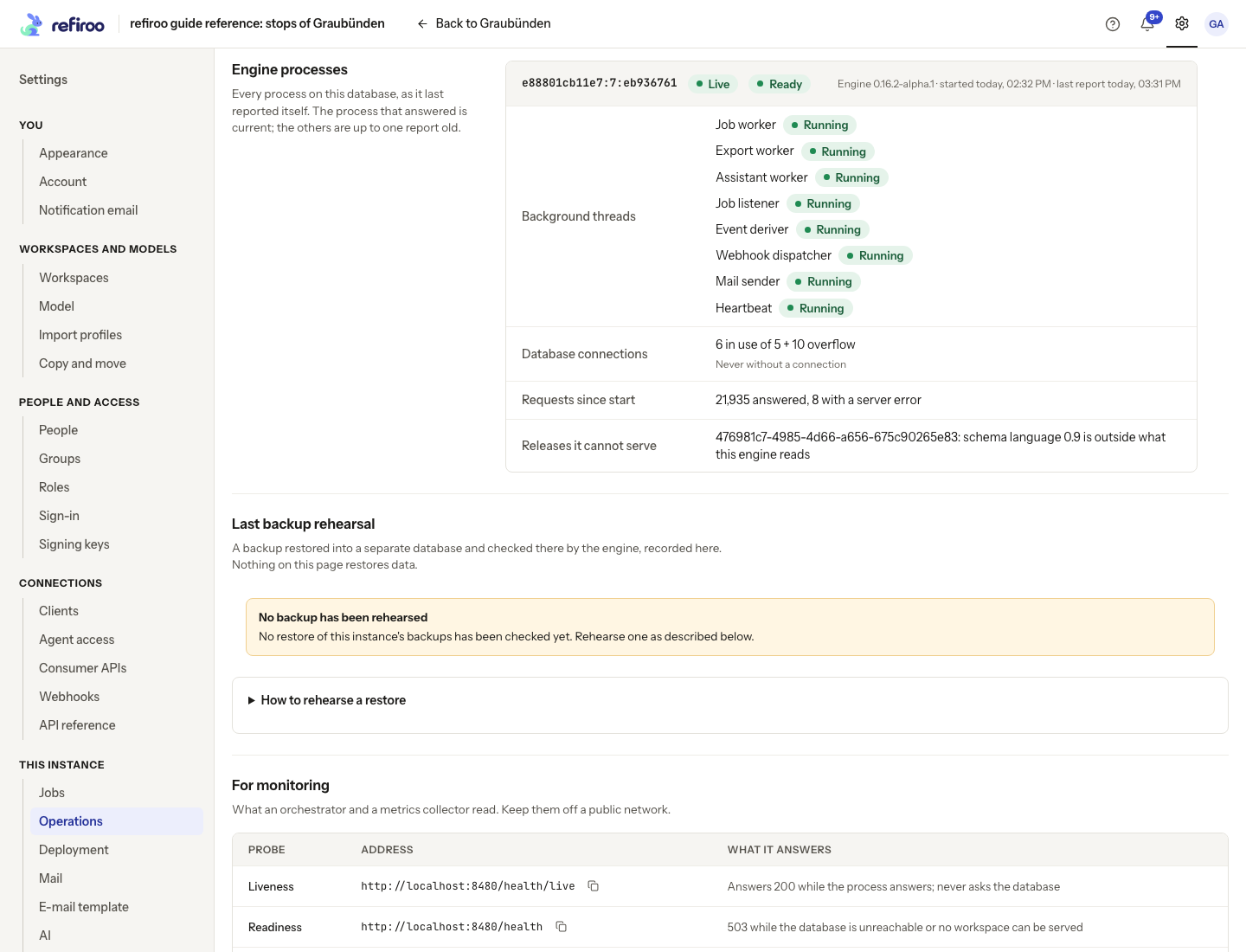
dropdb rdm_restore_checkOpen Settings › This instance › Operations › Last backup rehearsal. Before the first check, No backup has been rehearsed means no result has been recorded. After a check it shows Passed or Failed, the backup name when supplied, the copy’s revision and the workspace results. Records, Relationships, Open change sets and Publications count the restored copy; Live now compares the current instance. Different counts alone do not fail the check. The same results are readable as JSON through the backup rehearsal operation, with its API reference.
Use Show earlier rehearsals (N) to expand older results, Load more rehearsals when offered, and Hide earlier rehearsals to collapse them. How to rehearse a restore gives the command sequence; it does not execute it. Nothing on Operations runs a restore.
| Failure code | Safe next step |
|---|---|
DATABASE_COLLATION |
Recreate the scratch database with ICU root und, restore and check again. |
DATABASE_EXTENSIONS |
Install the required extensions in the copy or allow the preparation role to do so. |
DATABASE_REVISION_UNKNOWN |
Use the engine version that understands the backup’s revision. |
DATABASE_MIGRATION_FAILED |
Preserve the diagnostic, resolve the reported migration cause, then repeat on a fresh copy. |
DATABASE_UNREACHABLE |
Correct the copy’s server address, credentials or network access. |
DATABASE_URL_INVALID |
Correct the restored database URL before retrying. |
WORKSPACES_NOT_SERVED |
Inspect each failed workspace’s release. Use a compatible engine or resolve its model before relying on that backup for recovery. |
Keep the failure result as evidence and repeat the rehearsal after correcting its cause. For local development, scripts/postgres.sh backup and
scripts/postgres.sh rehearse automate the private server’s backup, restore check and scratch cleanup.
Recover the installation
Section titled “Recover the installation”- Stop every engine process and prevent traffic and integrations from writing.
- Create a replacement database with ICU root
und, or empty the recovery target deliberately. Restore the dump there withpg_restore --no-ownerusing PostgreSQL client tools. - Restore the matching source-file volume and configuration, including the backup’s encryption key.
Point
DATABASE_URLto the recovery database; do not change a database password merely by editing.env. - Start the application version kept with the backup, or a compatible newer one that migrates it.
- Check readiness, every active workspace, sign-in and needed files before reopening traffic.
For a host or custom installation, DATABASE_URL selects the recovery database. In the reference
Compose file it is constructed from the database service and POSTGRES_PASSWORD: a
DATABASE_URL line in .env does not override it. Recover the service’s rdm database and its
matching volumes, or explicitly adapt your deployment configuration to the replacement database
before starting engines. Preserve the old volume until the recovery has been checked.
A restore replaces the whole database. Activating an older model, withdrawing a publication or starting a change set from an earlier publication does not restore data. For partial recovery, read the desired records from a restored copy and write reviewed changes through the API or a change set. Recovery time and production backup sizing for your installation are not measured; rehearse your own data and record the result.
Make a consistent database and file backup with Compose
Section titled “Make a consistent database and file backup with Compose”For the reference installation, you need Docker access, free space outside the named volumes and a maintenance window. The database image supplies PostgreSQL 17 client tools; the engine image supplies Python for archiving its mounted job files. The commands below use the standard Compose file and a new host directory. Choose a unique directory for every backup. Keep traffic and all external writers closed until the engine is started again.
-
Create a private backup directory and stop all file-changing engine work. The database stays up:
Terminal window umask 077mkdir -p backups/before-maintenancedocker compose stop engineIn a multi-instance installation, stop every engine using this database and file directory. Verify the stop completed. Background work stops too; an interrupted chunk is rolled back or recovered under its lease. No browser or integration should write directly to the database.
-
Dump the database, then archive the unchanged file volume:
Terminal window docker compose exec -T database pg_dump -U rdm -d rdm -Fc \--exclude-table-data=engine_processes > backups/before-maintenance/database.dumpdocker compose run --rm --no-deps -T engine python -c \'import sys,tarfile; t=tarfile.open(fileobj=sys.stdout.buffer,mode="w|"); t.add("/opt/refiroo/rdm-engine/data/job-files",arcname="."); t.close()' > backups/before-maintenance/job-files.tarBoth commands are silent on success and must exit 0. Check each status before proceeding. Redirection can leave a partial file after failure; do not label that file a successful backup. A database dump and file archive made while every engine is stopped represent one unchanged application state. No running file cleanup can remove inputs between the two copies.
-
Keep the matching private environment securely, and write the source/application version into your recovery record. For the default settings file:
Terminal window cp .env backups/before-maintenance/installation.envchmod 600 backups/before-maintenance/installation.envtar -tf backups/before-maintenance/job-files.tarExpect relative file paths, or only
.for an empty job directory. Put encryption keys in separately controlled storage, outside the database backup, and associate their version with this recovery record. Preserve any custom bootstrap files and valid TLS materials too. With automatic HTTPS, preserve thecaddy-datavolume using your storage platform’s backup process. -
Resume normal operation with
docker compose up -d engine, check readiness and sign-in, then reopen writers. Copy the backup off the application host into your protected backup storage. Rehearse before relying on it. Backup schedule, disk minimums, offsite retention and recovery duration are not measured for your organisation.
Rehearse the reference dump inside Compose
Section titled “Rehearse the reference dump inside Compose”These commands create only rdm_restore_check. Confirm that name is unused before starting;
do not substitute rdm, the live database. The reference PostgreSQL account initializes the server
and can create the scratch database; a custom runtime role should not be given that privilege
merely for this task.
docker compose exec -T database createdb -U rdm -T template0 \ --locale-provider=icu --icu-locale=und --locale=C rdm_restore_checkdocker compose exec -T database pg_restore -U rdm --no-owner --exit-on-error \ -d rdm_restore_check < backups/before-maintenance/database.dumpStop on either failure. A successful restore finishes with exit 0. Then run the checker in the engine image, deriving the scratch URL from its configured connection without writing the password in a command argument:
docker compose run --rm -T engine python -c \ 'from app.db import configured_url; from app.cli.restore_check import main; raise SystemExit(main(["--restored",configured_url().set(database="rdm_restore_check").render_as_string(hide_password=False),"--backup","before-maintenance/database.dump"]))'Expect Backup rehearsal passed., each workspace’s model and counts, and
Recorded in the instance (Settings › Operations). Delete the copy when done.
The recorded result belongs to the live instance. The checker changes/prepares only the restored
copy’s schema and records the result in live; it does not activate the copy as the live database.
Its database/model check does not verify the file archive: inspect the archive and separately
exercise needed source/download files during your isolated recovery trial.
After reading the result, remove the scratch database:
docker compose exec -T database dropdb -U rdm rdm_restore_checkA failed rehearsal is evidence that recovery needs work. Keep its recorded failure and diagnostics, correct the cause and retry from a fresh scratch restore; do not switch production to a failed copy.
Restore on a replacement host
Section titled “Restore on a replacement host”The safest whole-instance recovery keeps the old host and volumes untouched, isolated from writers, while a replacement is checked. On that host, obtain the matching source version, Compose files, private configuration and backup pair. Use the same project and environment-file selection as the original; then:
-
Restore the protected configuration to
.env, restore certificate files if using file mode, and make sure DNS/traffic still cannot send production users to the replacement. -
Start only PostgreSQL:
docker compose up -d database. Wait for its health check. An empty reference volume creates an emptyrdmdatabase with the required collation. -
Restore into that empty replacement database:
Terminal window docker compose exec -T database pg_restore -U rdm --no-owner --exit-on-error \-d rdm < backups/before-maintenance/database.dump -
Build the matching engine image with
docker compose build enginebefore restoring files. On a fresh host this downloads dependencies and prints build progress; wait for success. Restore the matching file archive with the engine stopped:Terminal window docker compose run --rm --no-deps -T engine python -c \'import sys,tarfile; t=tarfile.open(fileobj=sys.stdin.buffer,mode="r|*"); t.extractall("/opt/refiroo/rdm-engine/data/job-files",filter="data"); t.close()' < backups/before-maintenance/job-files.tarUse only your trusted backup archive. The command runs as the engine user and must exit 0. The archive is extracted into a new job-file volume; do not overlay it on unrelated newer files.
-
Start the matching images with
docker compose up -d --build(with automatic HTTPS, with both Compose files, as in Upgrades), inspect bounded engine logs, readiness, every workspace, sign-in and important files. Review integrations before reconnecting them: external receivers can already hold events sent after the backup, so reconcile them rather than assuming their state rolled back too. -
Only after those checks move traffic and reopen writers. Keep the old host isolated and retained until recovery is accepted. Switching back after new writes requires another reconciliation or recovery decision; it is not a lossless automatic undo.
Restoring into a populated database causes conflicts; stop and prepare a deliberate empty recovery target instead of ignoring errors. A wrong encryption key may allow database restore yet prevent sign-in or stored-secret use: supply the key associated with that backup. Never generate a new key as a recovery shortcut. Whole-instance recovery reverts data written after the backup.
Move the installation and retire the old host
Section titled “Move the installation and retire the old host”Use the replacement-host procedure for a planned move too. Keep one authoritative writer:
stop every old engine before making the final database/file pair, restore that pair on the new
host and leave the old host isolated while validating. Preserve PUBLIC_URL if the public name
stays the same; changing the name also needs the
sign-in cutover.
Keep the old environment, source version, keys and volumes until the replacement and its first new backup have been checked. Forward new backups and monitoring to protected storage independent of the replacement host. A working restored database alone does not check DNS, TLS, mail, provider callbacks, webhook receivers or the availability of retained source files.
After acceptance, stop/remove the old containers and arrange deliberate retirement of their volumes,
private configuration, certificate keys and backup copies according to your retention policy.
docker compose down keeps volumes; down -v destroys them. Do not run either against the wrong
project or while relying on its only recovery copy. Credentials shared with the replacement must
remain valid there; retire obsolete host access and rotate compromised credentials separately.
The application supplies no host decommissioning or offsite-backup scheduler.