Background jobs
Background workers run inside each engine process. INTEGRATION_JOBS_ENABLED=true, the default,
enables creating and running jobs. Turning it off keeps job reads available but stops workers and
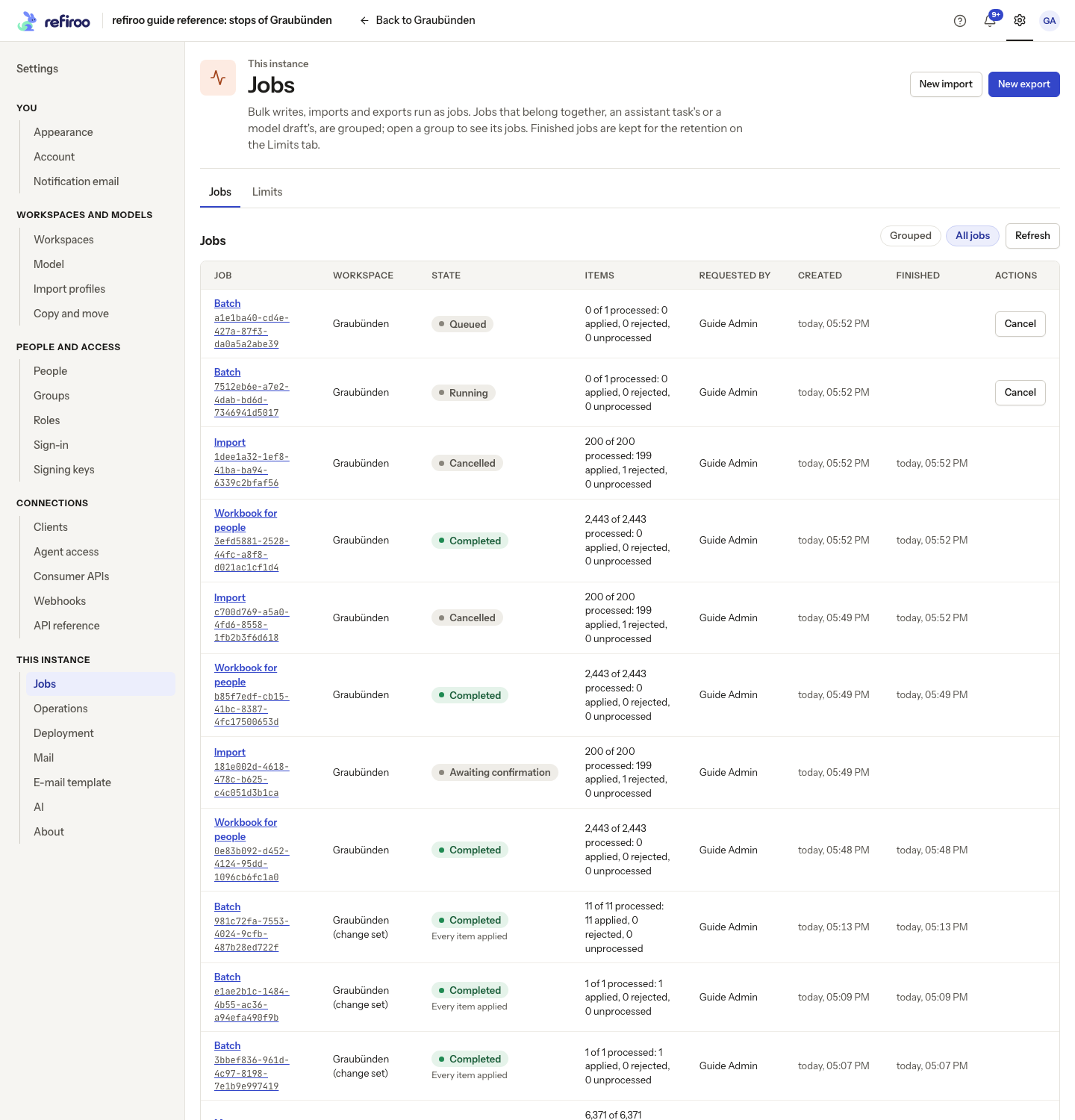
job mutations. Work also needs a healthy model. Check Settings › This instance › Jobs for job
state and outcomes, and Operations for worker health. Permissions determine which jobs a person
may inspect or cancel; see Jobs.
Inspect results before retrying
Section titled “Inspect results before retrying”A job may be queued, running, awaiting confirmation, completed, failed, cancelled or expired. A completed job can still contain rejected rows. Read its applied, unchanged, rejected and unprocessed counts, and open individual outcomes for the refusal code and reason.
The request’s failure policy matters. An atomic batch applies all its items in one transaction
or none if an item is refused; an independent batch keeps successful items and reports refused
ones separately. Cancellation of independent work retains committed chunks. Do not promise an
all-or-nothing result merely because the work was submitted as one job.
Correct refused rows before retrying. For imports, preview the corrected file again: already-loaded rows can be reported as unchanged. For a batch, submit the corrected items with current versions; blindly sending every create again can return duplicate-ID refusals. An expired preview needs a new preview, even if an old browser page still shows it waiting.
For an integration, the sequence is submit a batch or import, follow the returned job, inspect its outcomes, then confirm a preview or correct its refusals. See the batch, import and job operations in the API reference. The requester needs write permissions in the chosen workspace and any required change-set claim; jobs recheck the requester’s rights as they run. Losing access, retiring the workspace, or changing its selected release can stop remaining work.
If creation or cancellation routes are missing, check INTEGRATION_JOBS_ENABLED on Deployment.
With it off those routes are absent, not merely paused buttons. Existing job reads still work.
Enable it on the intended deployment and recreate the engine before retrying; enabling it grants
no additional permissions. Monitor the worker before submitting the same work again.
Restart and cancellation
Section titled “Restart and cancellation”A graceful stop finishes the running chunk and releases the lease. After a crash, that chunk rolls
back. Another worker resumes at the first item without an outcome after the lease expires;
completed items are not applied twice. JOB_LEASE_SECONDS defaults to 120 and is renewed by a
heartbeat every third of that interval. A queued job may be waiting behind another batch or import.
Cancellation takes effect at the next chunk boundary. An atomic job rolls back completely. An import that is still reading checks cancellation every 10,000 rows. Exports also check every 10,000 rows, with CSV checks between records and relationships. A database outage is retried every two seconds and does not need a process restart when connectivity returns.
JOB_CHUNK_ITEMS defaults to 500; larger chunks keep a workspace’s write lock longer.
JOB_RETENTION_DAYS defaults to 7 for finished outcomes and idempotency keys. Expiry runs hourly.
Check the limits catalogue before raising item counts or file sizes.
Keep and back up the file directory
Section titled “Keep and back up the file directory”JOB_FILE_DIR defaults to var/job-files under the backend; the Compose image uses the persisted
/opt/refiroo/rdm-engine/data/job-files volume. Startup creates it and refuses an unwritable directory when job creation
is enabled. Share it across instances. Do not remove files manually to free space: extend storage
or adjust retention and let cleanup enforce the lifecycle.
| Work | File lifetime and recovery |
|---|---|
| Export | Writes a {jobId}.{lease}.partial belonging to that worker, then renames to JSON Lines, CSV or XLSX on completion. Output remains until job expiry; failed/cancelled and orphan files are cleaned at startup or the hourly sweep. 410 JOB_OUTPUT_MISSING means rerun the export. |
| Import | Upload is {jobId}.source, retained while waiting or running, including preview confirmation. Removed on finish. IMPORT_FILE_MISSING means upload again. |
| Model draft or import-profile source | {sourceFileId}.upload remains with its draft/profile. Superseded files remain for JOB_RETENTION_DAYS; orphan cleanup waits at least ten minutes. SOURCE_FILE_MISSING means upload again. |
Back up source files with the database. Disk sizing is not measured for your workload: allow for concurrent uploads, retained exports and current plus superseded source workbooks.
Exports and previews
Section titled “Exports and previews”Exports have their own worker, so they do not wait behind imports or batches. Exports run one at a time per worker. Each reads one repeatable-read snapshot; it does not block writes, but a long export keeps PostgreSQL from reclaiming rows changed since that snapshot. A crashed export restarts from the beginning after its lease, rather than appending to its old file. Each lease has its own partial file, so an old worker that resumes after takeover cannot overwrite the current worker’s partial output.
Imports read XLSX cached values, CSV and JSON Lines; legacy .xls must be converted to XLSX.
An import binds its file in one transaction, then applies items in chunks. A crash before binding
commits causes binding to start again.
A preview applies up to JOB_PREVIEW_MAX_ITEMS (default 10,000) in a transaction that rolls back.
Beyond that it is a sample. It holds the workspace’s write lock or change-set claim during the
preview, then holds neither lock nor lease while waiting for confirmation. Its file remains until
confirmation, cancellation or expiry, normally seven days after preview completion. Confirmation
binds the file again against current data.
Profiling and model dry runs share the batch worker. Profiling stages filled workbook cells in the database. A dry run previews every row in one rolled-back transaction and can delay writes for its whole duration; the preview sample limit does not bound that work. A newer dry run cancels a running one for the same draft. Keep the proxy’s job event stream unbuffered; it sends keep-alive comments every 15 seconds.
Source-workbook uploads also obey IMPORT_MAX_BYTES. Profiling copies every filled cell into the
database, so file-volume space alone does not cover this storage. For sizing, a
10,000-row, two-sheet workbook can produce about 330,000 staged cells, depending on its width. These rows are removed with
the source file. Size your database for the actual workbook widths as well as their row counts.
For spreadsheet safety, XLSX exports write text as text. CSV preserves strings beginning with
=, +, - or @; spreadsheet software may interpret them as formulas when opening the file.
With HTTP/1.1, a browser’s roughly six connections per site can make additional job streams wait. Use HTTP/2 at the public entry for many simultaneous streams; this is separate from whether the workers themselves are progressing.
Check worker storage and restart one reference instance
Section titled “Check worker storage and restart one reference instance”You need Docker access, Operations access, a workspace with a servable model and permission to
inspect the affected job. First inspect Deployment’s INTEGRATION_JOBS_ENABLED and Operations’
worker state. In the reference image the engine user is UID 10001 and the persistent directory is
/opt/refiroo/rdm-engine/data/job-files. Confirm that existing storage is mounted and writable:
docker compose exec -T engine python -c \ 'import os; from pathlib import Path; p=Path("/opt/refiroo/rdm-engine/data/job-files"); print("exists:",p.is_dir(),"writable:",os.access(p,os.W_OK))'docker compose exec -T engine df -h /opt/refiroo/rdm-engine/data/job-filesdocker compose logs --tail=100 engineExpect exists: True writable: True and enough free space for queued inputs and retained outputs.
The access check does not reserve space or prove a future write can succeed; startup also performs
an actual write/delete probe. For JOB_FILE_DIR followed by cannot be created or written, fix
the mount, disk space and user permissions, then recreate the engine if configuration changed.
Do not make the whole directory world-writable or delete source workbooks to silence that refusal.
Before an ordinary restart, record the job ID and its current applied/rejected counts. Run:
docker compose restart enginecurl -i https://refiroo.example.org/healthCheck that readiness returns 200 and the worker is Running on Operations. Follow the same job,
not a duplicate submission. If a process was forcibly terminated rather than stopped cleanly,
allow the default 120-second lease to expire before expecting takeover. A changed .env requires
docker compose up -d engine, not just restart. Reopen the job to check its actual outcomes after
recovery; a completed job can still have refusals.
Missing files and cancellation recovery
Section titled “Missing files and cancellation recovery”| Code | What remains and what to do |
|---|---|
JOB_OUTPUT_MISSING |
The completed job exists but its output file does not. Run another export; the old job cannot recreate its download merely by being reopened. |
IMPORT_FILE_MISSING |
The import cannot read its retained input. Re-upload through the import workflow and inspect already committed outcomes before confirming another load. |
SOURCE_FILE_MISSING |
A draft/profile’s source file is absent. Upload the intended workbook again; a database row alone does not contain its original bytes. |
Use the Jobs workflow for permission-aware cancellation. A cancel request is not an immediate kill of the SQL statement in progress. Confirm the job reaches its terminal state before deciding what needs correcting. Atomic work rolls back; independent work keeps earlier committed chunks and has no automatic undo. Review corrective changes through the normal record/change-set workflow. For a load that must be wholly undone outside those changes, use a planned whole-instance restore and account for unrelated writes since the backup.
Do not extend retention to repair missing files. Changing JOB_RETENTION_DAYS helps preserve
future retained results; it cannot reconstruct content already deleted. An export’s long snapshot
can delay PostgreSQL cleanup without blocking writers: if disk use rises while large exports run,
inspect those jobs and database activity before assuming a workspace lock is stuck.
Change retention or move the file directory
Section titled “Change retention or move the file directory”JOB_RETENTION_DAYS sets the expiry recorded when a job finishes or a preview begins waiting.
Changing it does not reset the stored expiry of jobs already finished or awaiting confirmation.
It also cannot restore expired outcomes, removed input files or old idempotency keys. Before
lowering retention, agree the download and preview-confirmation window with users and integrators.
Source workbooks still attached to a draft/profile have their own lifetime, as listed above.
Only the batch worker performs the job/file expiry sweep. With INTEGRATION_JOBS_ENABLED=false,
that instance runs no job cleanup; another job-enabled instance sharing the database and files
can do it. Disabling jobs is not a disk-cleanup action. Expiry retains the job’s summary but removes
its item outcomes, inputs and idempotency keys. A later request with an expired key is new work,
so the integration must not rely on that key forever to prevent duplicates.
To relocate storage, stop every engine that uses the directory, take the
consistent database and file backup, then copy the whole directory
with its ownership and permissions preserved. Mount the replacement at the configured container
path on every instance before starting any worker. In the reference image, changing
JOB_FILE_DIR alone does not move the Compose volume: its mount is fixed at
/opt/refiroo/rdm-engine/data/job-files. Adapt the mount too or keep that container path and move
the storage underneath it.
Start with the matching database and check writability, readiness and an existing source/download file as well as a new export. Preserve the previous copy until these checks pass. If the storage change fails, keep all workers stopped while restoring the previous mount and path; do not let different instances process the same jobs against different file copies. Assistant folders and session files require their separate mounts too, as What you run explains. No running instance automatically copies files to a new directory.
Consumer-event derivation
Section titled “Consumer-event derivation”The eventDeriver thread reads each workspace’s change feed for consumer APIs whose model declares
events. It runs while a model is healthy, needs no separate setting and takes no workspace write
lock. Disabling webhook delivery does not stop this derivation. It looks for changes once a second.
Several processes share the work, deriving one workspace at a time. A crash rolls back the page in
progress and derives it again without losing or duplicating events. Database outages use the same
two-second retry and bounded outage logging as other workers. Hourly cleanup follows
FEED_RETENTION_DAYS and the change-feed floor.
If a receiver seems behind, compare the consumer events response’s headPosition with the
workspace feed head. The first is how far events have been derived; the second is how far writes
have reached. A gap here is derivation lag rather than a receiver failure. Check eventDeriver on
Operations before resetting a subscription. See Consumer events and webhooks
and the API reference for the reads used by the integration.
Assistant and mapping-proposal jobs
Section titled “Assistant and mapping-proposal jobs”The built-in assistant uses a separate worker for its tasks; mapping proposals run as background
jobs too. The assistant needs AI_AGENT_COMMAND, AI_SEND_LEVEL=values, enabled job creation and
the requester’s workspace permissions. A provider alone does not enable assistant tasks. See
Set up AI before enabling these jobs: workbook and record data can leave the
instance and each turn can consume paid usage.
For an assistant task or mapping job, the job page shows its summary and links to the task or view when the reader may open it. Inspect the task’s notes and check as well as the job’s outcome. A turn has a 30-minute limit, separate from the provider timeout. After a worker interruption, the next turn records the earlier turn as interrupted. Stop during an assistant load discards the change set being loaded and returns to the accepted proposal; stopping a mapping-proposal job keeps proposals already written. Neither publishes to live data.
Tasks use AI_TASK_RETENTION_DAYS (90 by default), separately from ordinary job retention. Session
folders, logs and transcripts stay while a task can continue; the next read after publication,
discard or confirmed migration removes them, and expiry also cleans them. In the shipped image,
each task has a randomly named folder under /opt/refiroo/rdm-engine/data/assistant, with
working files in work, Claude Code configuration and transcripts in claude, and turn logs
inside the same task folder. Session users cannot list the parent folder to find other tasks.
Compose persists this in the single assistant volume across container replacement, until normal
cleanup. Backups may omit it; losing it loses open tasks’ folders and session logs, not records.
After upgrading from the earlier shared-transcript layout, existing files are kept but the next
turn starts a new session. See Upgrades.
The Calls tab on Settings › This instance › AI keeps turn outcomes and usage separately. See
AI retention and recovery before maintenance or a retry.