

Change records with the assistant
Use this to ask the assistant to prepare changes to records the workspace already holds. It needs Use AI proposals, Bulk and import, Work in change sets, available jobs and an enabled assistant at the values send level. Your words and the workspace model go to Claude Code, which reads records as needed. Turns can incur costs and task files are retained. See AI and your data and Loading with the assistant for the rules.
- Open the current workspace’s ⋯ menu and choose Ask about these records… where it is offered. You can also choose Import… and leave Workbook empty in Load a workbook. Confirm Into names the intended workspace.
- In Tell the assistant about this file (optional), say which records should change, how to find them and the desired result. Words are required when there is no workbook. For example, with the reference data: “Set the Abbreviation of the stop ‘Thusis Süd’ to ‘THSD-REVIEW’.” Use the names of fields and relationships in your model. Instructions are limited to 4,000 characters.
- Read the sending note and choose Ask the assistant. This starts a saved task; it is different from Ask on a table list, which only chooses filters. Until a proposal exists, the journey bar and trail say Change with the assistant. With a proposal, they say Change records if the model stays unchanged, or Change this model if it changes. The task heading gets a short title with the assistant’s first answer; any draft it makes is named Assistant: followed by that title. Your full instructions stay under You said: on the proposal. Until the title arrives, including after a stop or failure before an answer, the heading uses your words, shortened at a word boundary with “…” if needed.
- Read the proposal and any counts or checks shown. Check that it affects the intended records and reuses existing types and records where appropriate. Answer any Questions with Answer and design again, or use Tell the assistant what to change and Send to the assistant. If the task proposes a model change, inspect Show the model change and involve a model administrator before accepting it. If the summary says No type, attribute or relationship changes, open the draft in the model editor: it may still change views or layout. When a task without a workbook says No change to the model., there is no model draft, model-change detail or model editor button.
- When the proposal and any checks match your request, choose Accept for words alone with no model change. The session prepares a new change set on the workspace’s current release; it installs and activates nothing. It changes no Live record. If the proposal also changes the model or moves records between types, follow Change a model with the assistant for its Accept the model and migration or staged-move steps. A workbook proposal showing What the load does uses Accept and load to change set: the engine loads the checked records and relationships as one batch without another assistant turn. If the assistant cannot do the task, read its reason and correct the instructions rather than assuming a partial or empty load completed the request.
- Choose Review the change set. Review the actual differences, validate and follow the approval and publication steps. The workspace’s normal approval rules apply, including a second person where required.
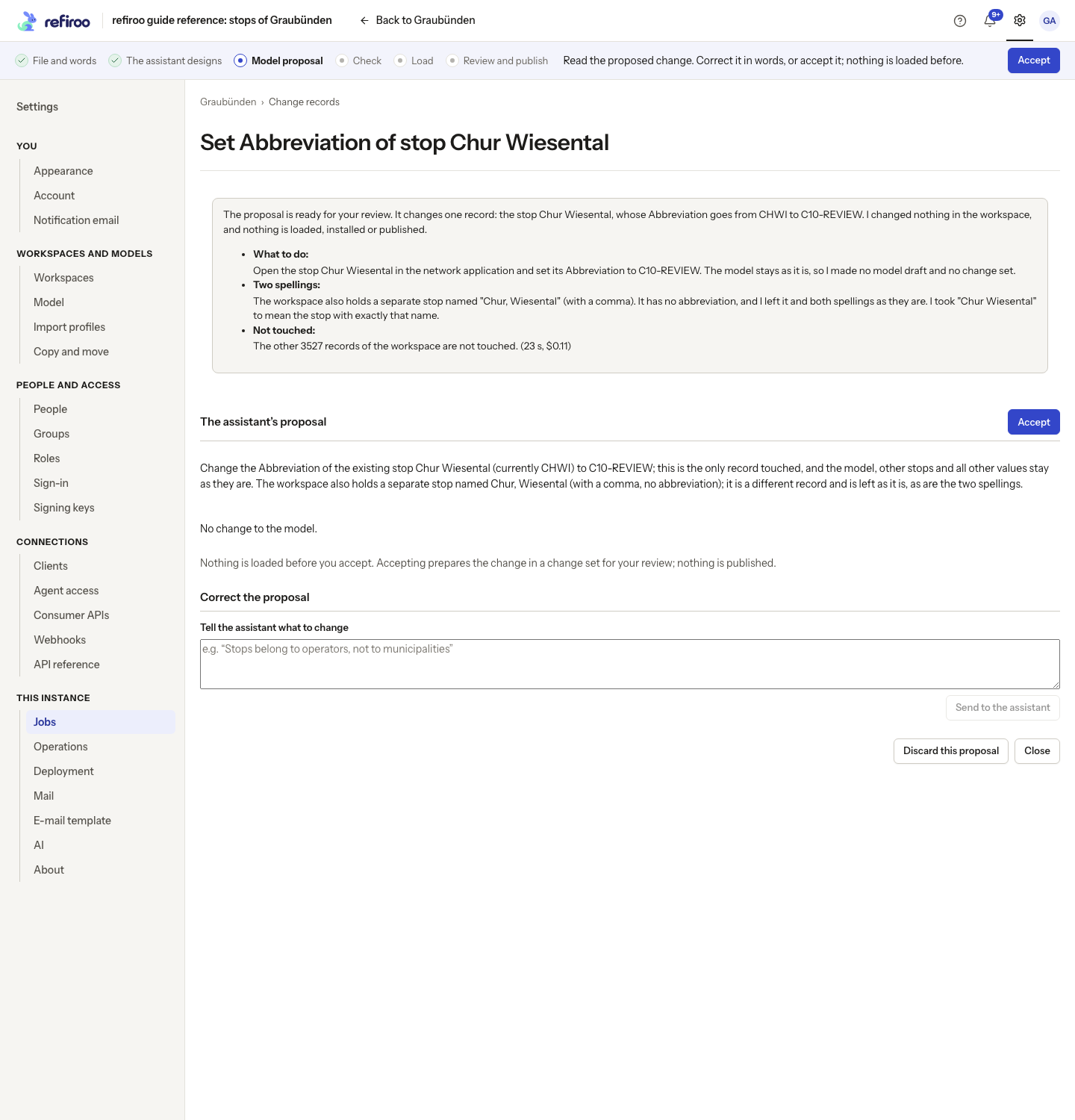
Above: the proposal changes the Abbreviation of Chur Wiesental in the reference data. Accepting prepares a change set for review; nothing is published.
For a wrong result, continue or correct the same task while its session is available. Instructions about stored records do not create a reusable file layout. A workbook loaded from the assistant’s checked records and relationships saves no import profile either; send the next file to the assistant again.