

Types, attributes and relations
Define a type for each kind of record people maintain. Its attributes hold values; its relationships connect records. You need Model authoring to change these definitions in a draft. Models explains when changes reach a workspace.
Types and where records stand
Section titled “Types and where records stand”The editor calls a record type an Object type. Name is singular; Plural name labels its collection. Stands places it at the top level or under another type. A child is joined to its parent by a containment relation, with names in both directions. Containment is not an extra label on an ordinary relationship: it defines the record hierarchy too.
A type may be listed in several applications while keeping one definition and one set of rules. Removing a listing differs from removing the type. Follow Add a record type and fields or Split, merge and move types.
Attributes and shared definitions
Section titled “Attributes and shared definitions”An attribute type defines a reusable field, including its name, value type and features. The value types offered are Text, Long text, Whole number, Decimal number, Yes or no, Date, Date and time and JSON. Choose the type for the value people hold, rather than storing every value as text.
An attachment to a record type determines Required and Read-only there. Unique belongs to the shared attribute definition. Changing a shared name, value type or feature affects every attached type; Shared with identifies them. A required field needs a value; a read-only field cannot be changed through the ordinary record form. Searchable includes the field in search and Filterable permits filtering. Views choose which filter controls they offer. Sortable is shown, but ordinary non-JSON fields can sort from list headers regardless of that checkbox. These features do not select table columns. JSON fields cannot be made unique, sorted or filtered. They can be displayed in a table or record field; they are not eligible as candidate criteria or scalar labels for trees and matrix column headings.
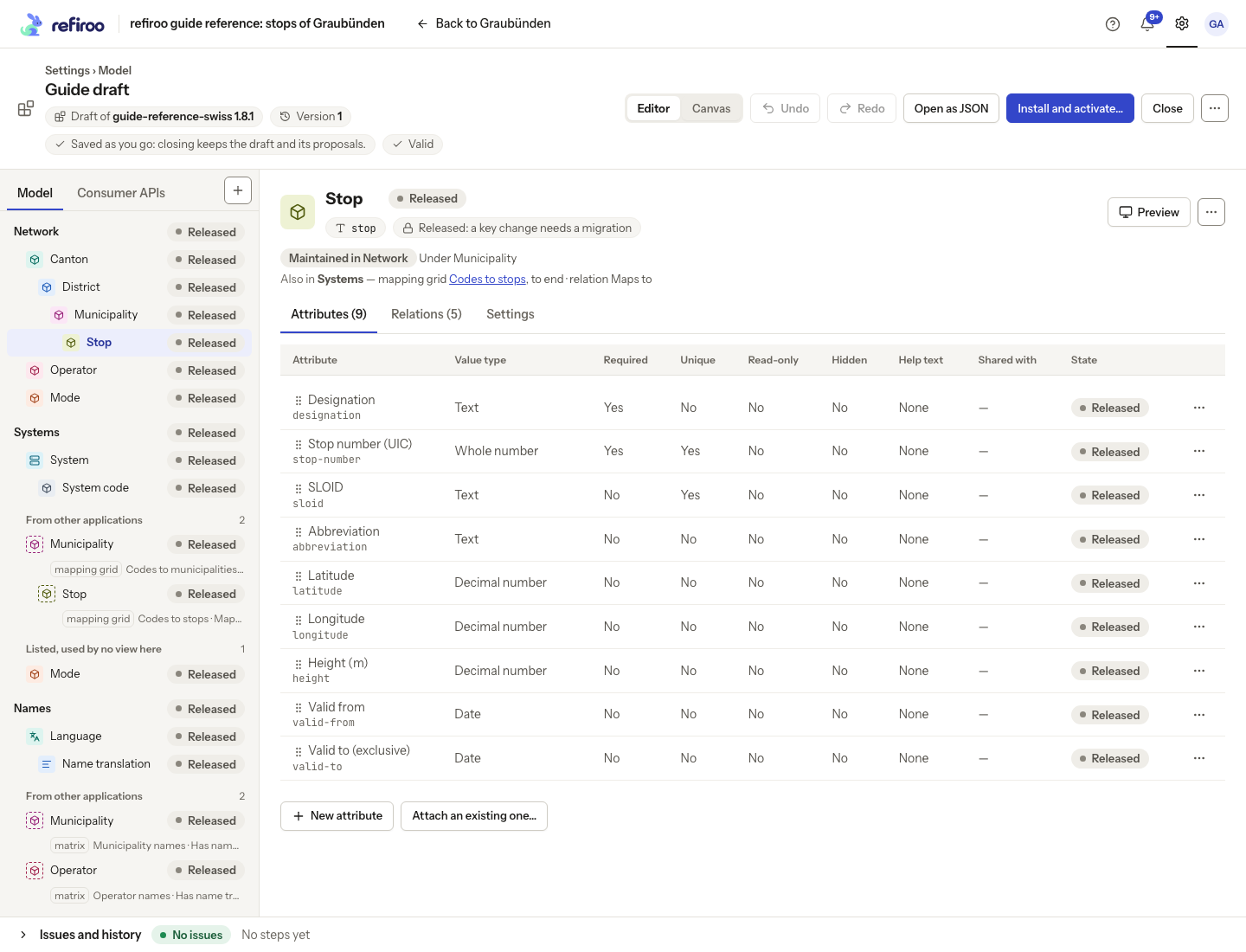
Above: Stop has nine attributes with their value types and local rules. Its facts say Released: a key change needs a migration.
Reuse and change attributes explains the controls. The visual editor sets numeric bounds and effective periods. Attribute defaults need a specialist in the JSON view. The editor does not offer text-format or length rules. A list of reference choices is modelled as related records, rather than as another value type: Turn an attribute into a list.
Relationships and permitted pairs
Section titled “Relationships and permitted pairs”A relation type supplies the forward and reverse meanings. Permitted pairs separately say which types it may join. Their Cardinality limits the number of connections at each end; Required declares dependent ownership: the target is created with its owner connection. It is supported for one-to-one or one-to-many relationships; Many to one cannot be required. Which records can narrow candidates by name, attached attributes or ancestor. Criteria can apply to the records chosen and the records choosing. Do not confuse a candidate rule with a filter that hides rows in one view.
Relationship matrix shows all permitted type pairs. Rows are the from end. Each cell lists the relation types and number limits, with contains for containment. Select a pair to inspect or change its permissions. This design grid differs from a relation matrix that people use for data.
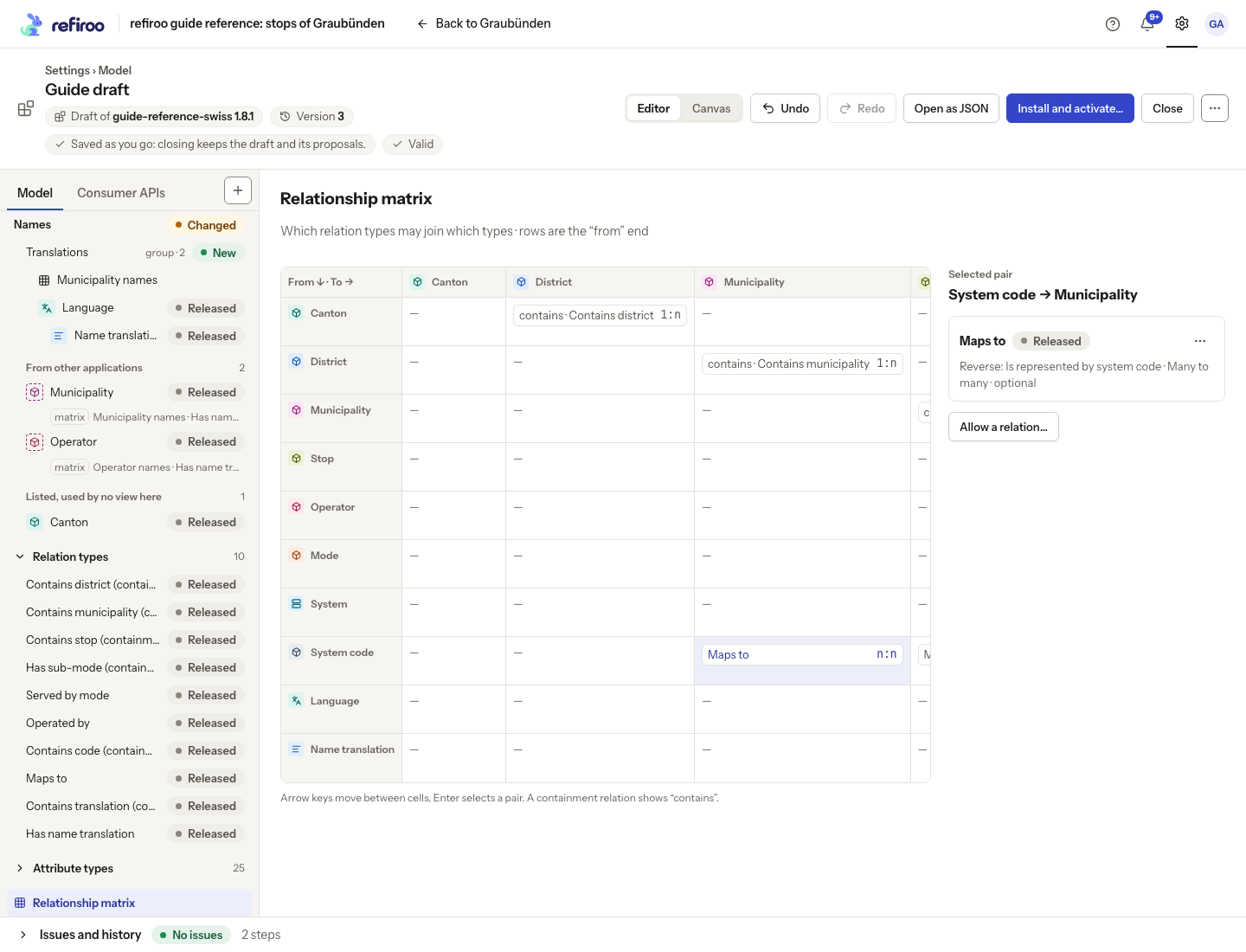
Follow Add a relationship.
The attributes carried by a permitted pair belong to each connection, not to either record. Reference-data example: Operated by, from Stop to Operator, carries Local name (Text), Primary contact (Yes or no) and Inspected on (Date). Maps to, from System code to Municipality, carries Confirmed (Yes or no) and Note (Text). These fields describe each connection, so connections to the same operator or municipality can hold different values. The model chooses which fields each permitted pair carries.
Choose the shared definitions in the pair’s Carries cell. All eight attribute value types listed above are available. The pair is directed: the selected from type, relation and to type determine which attributes it carries. Opening the same connection from its other end reads the same stored values; it does not create a second set. Another permitted pair using the same relation type can carry different attributes.
People see these values in the record’s Relationships panel and a relation matrix’s cell table. A relationships table can put them beside both records or under column groups in a grid. Follow Add a relationships table to choose its layout. Declaring carried attributes does not add a view by itself. A consumer API can explicitly expose these values within a related block; carrying a field does not automatically publish it to other systems.
Released elements and migrations
Section titled “Released elements and migrations”You can rename, re-key, remove or reshape a released element in the editor. Labels change without changing identity. A released key can also change, but needs a migration even when there are no records: integrations naming the old key must change with it.
A structural step that affects stored data applies to the draft and is marked Needs a migration in History, with the records, values and relationships that hold the element. The counts cover Live and open change sets in every workspace running the draft’s model; workspaces running other models and immutable publications are not counted. A structural step with nothing holding the element has no mark, except for a released key change. Activation checks the data again.
Menus warn Needs a migration when installed. Saving the step does not change live data. Installing the draft shows the migration to review before activating it. See Migrations for what is carried, created, removed or refused.
See Rename or re-key an element and Remove an element.
Rules beyond the visual forms
Section titled “Rules beyond the visual forms”The type’s Settings chooses a Display attribute, an Effective period, At least one of and Parent relationships. A display field must be attached to its type. An effective period uses appropriately typed fields and requires a valid date order. Relationship attributes retain their types just as record fields do.
A relationship’s uniqueness rule can also be limited by a declared ancestor scope or condition. Those references must resolve to the appropriate type and field. Such rules apply to writes through all clients; a hidden field or filtered view does not bypass them. The visual candidate editor offers Which records may be chosen and Which records may choose, with names, fields and ancestor fields. Candidate criteria govern new choices; a later value change does not automatically remove an existing relationship.
A mapping grid’s relation cannot be containment or required ownership. Resolve the named model issue by selecting a suitable relationship, rather than treating an application name as a special permission to use the view. For the visual relation controls, select a Relation type to edit Names and Reverse name and inspect Allowed between. Allow between two types… chooses the From and To pair; Change keys… changes the identifying keys. Released key changes need a migration, and integrations naming those keys must change too.
Lists are types too
Section titled “Lists are types too”Give each independently maintained list its own record type. Its relationships then offer the right kind of record without filtering by a parent’s spelling. A list can have its own fields, related names and external codes. Do not tie a model definition to one existing record as a way to select a list: record values change independently of model releases. Use separate types and group their collections when there are many.
Value rules
Section titled “Value rules”A declared default supplies a missing field on creation. It does not refill a cleared value on an existing record. Required fields cannot be empty; empty text counts as missing. For an ordinary unique field, a non-empty value can be held by only one record in the workspace, across all types that use that shared definition. Empty values do not reserve a value. A change set checks its own effective data, and publication checks again against changes made elsewhere.
Whole-number and decimal fields may have a minimum, a maximum or both. Bounds must be finite numbers, and the minimum cannot exceed the maximum. The same bounds apply wherever the shared field is used, including declared relationship fields. A value outside a bound is refused; change the value or review the intended definition. Other value types cannot declare numeric bounds.
A type can also require at least one of a declared group of fields. This differs from making each field required. The rule checks the complete result of an edit, including clearing a field: people cannot clear the last populated field in that group. All named fields must be attached to the type. Choose At least one of… in the type’s Settings to select the group. Clear every selection to remove the grouped requirement. Set numeric bounds through an attribute type’s Minimum and maximum…; leave either end empty for no bound. Attribute defaults still need a specialist in the JSON view.
Number limits and ownership
Section titled “Number limits and ownership”| Cardinality | Limit at each end |
|---|---|
| One to one | A source has at most one target and a target at most one source. |
| One to many | A source may have many targets; each target has at most one source. |
| Many to one | A source has at most one target; a target may serve many sources. |
| Many to many | Neither end is limited to one by this rule. |
These limits are counted for the relation type at the limited end, including its other allowed type pairs. Adding another permitted pair does not give a record another single-choice slot.
For required one-to-one or one-to-many ownership, the source owns the dependent target. The target is created with that relationship; people cannot remove the connection alone and leave an invalid dependent. Confirmed cascade deletion of the owner also deletes its dependants. For an optional association, removing the source’s connections preserves the independent records at the other end. Containment cascade deletes descendants. In a change set these deletions remain proposed until publication; an existing publication stays unchanged.
A relationship stores only the fields declared for its allowed type pair. With no declared relationship fields, it cannot hold arbitrary extra values. Supplied values keep the shared field’s type and numeric bounds. Relationship fields are separate from either endpoint’s fields.
A type may contain more records of its own type, allowing several levels without creating a new type for each level. Declaring that structure does not itself add a tree view: choose its presentation separately. Move a record through its parent controls; a containment connection cannot be edited independently of the parent. refiroo keeps the parent and its typed connection together when records are created or moved.
A specialist can limit a relationship to one target per source and named ancestor of the target. For example, a record may have one current related name under each language record. A condition on a target field can restrict which relationships reserve that slot. The rule checks live data and a change set’s effective data, then checks the merged result at publication. Older publications do not reserve slots in current data. This is a relationship uniqueness rule, separate from a field’s workspace-wide uniqueness.
A relation’s discovery hint does not expand ordinary record search through its connections. Search uses record names and searchable fields. Creation controls and hierarchy presentation come from the declared panels and views, rather than from a relation’s descriptive hints alone.
Candidate criteria
Section titled “Candidate criteria”The two ends can have different criteria. With none, any record of the allowed type is eligible. Criteria can name the record’s name, any attached non-JSON field, or a name or field of an ancestor. The field need not be filterable in collection views.
| Field | Conditions offered |
|---|---|
| Text or long text | is, contains, starts with; the last two ignore case. |
| Numbers, dates and times | is, is less than, is at most, is more than, is at least. |
| Yes or no | is, with yes or no. |
| Any offered field | is empty, with yes or no. |
| Attached attribute | Also has no value, with yes or no, to test whether a value is held at all. |
Criteria use “and”, except that several is values on one field are alternatives. When several criteria name one ancestor type, one ancestor must satisfy them together. In a recursive hierarchy any ancestor of that type can qualify, at any depth. Unknown fields, an impossible ancestor type, JSON fields, unsuitable conditions and wrongly typed values prevent a valid model.
The same eligibility governs relationship pickers, bulk relationship changes, mapping grids and relation matrices. It also governs loads and writes from other clients. A grid normally omits an ineligible source, but keeps it visible when it already has the relationship. Removal still lists existing connections.
Changing values or criteria never automatically removes an existing connection, flags it as invalid or blocks publication just because it no longer qualifies. The rules apply to new choices. Use a purpose-made Yes/No field where possible: a condition on a name follows that name when someone renames the record. Follow Add a relationship to edit Which records may be chosen and Which records may choose.
Effective periods
Section titled “Effective periods”A type can declare one period of business validity using two different attached Date fields. Date and time fields cannot define this period. The starting date is included; the ending date is excluded. An empty start means no beginning limit; an empty end means no ending limit. Different records’ periods may overlap.
When both dates are present, the end must be later than the start. Equal dates are invalid. The rule applies to live edits, change-set edits, validation and publication. Activating a release that adds a period or changes its fields also checks existing records and refuses invalid periods. Correct the affected dates under the current model or revise the declaration before retrying.
This period is independent of record versions, history and publications. Other systems can read records valid on a chosen business date when the type declares a period. Removing the declaration keeps the date values but removes that date-based reading capability; for an exposed type this can require a higher consumer contract version. To set the period, open the type’s Settings, edit Effective period, and choose Starts on and Ends on. The control is offered when two Date attributes are attached, or a period already exists. Choose None: records have no effective period in Starts on to remove it. Check existing dates before applying the release.
Visibility, help and relationship settings
Section titled “Visibility, help and relationship settings”A type’s Attributes table has editable Hidden and Help text cells. Hidden leaves a field off record screens and forms; it does not remove its values or its validation rules. Do not hide a required field unless records can obtain its value another way. At Attribute types, the shared definition’s Settings applies Hidden and Help text wherever it is used. A locally hidden field stays hidden; a local No does not reveal a field hidden by its shared definition. Local help text takes precedence over shared help text; clearing it uses the shared text. Neither setting grants or removes access to stored data.
Select a Relation type and edit Oriented in Settings. It defaults to Yes. This affects cascade deletion: an oriented required one-to-one or one-to-many relationship can take the owned target records with its source. Optional relationships lose the connection while keeping the other record. Containment descendants are included independently. It does not rename the two directions or change their number limits.
On a type’s Relations table, Carries shows the shared attributes attached to that allowed pair. Choose Attributes of the relationship… to select them. This is available for non-containment pairs with attribute definitions to choose from; changing a released pair that stored data uses can need a migration. Cardinality and required… edits the pair’s number and ownership rules together. Saving definitions creates no relationships or values between actual records.
Parent relationships… selects incoming relationships that supply parent context for this type in trees and matrices. It is a draft-only structural choice. It differs from moving an existing record or choosing its containment parent. Review the eligible choices and Issues; do not use it to bypass the type’s placement rules.