

About AI in refiroo
AI is optional. You choose which features to enable in the engine’s environment, then restart it. People review the proposals before using them. To enable it, follow Set up AI.
Choose what to switch on
Section titled “Choose what to switch on”Three settings control separate capabilities. None requires the other two.
| Setting | What it enables | When left unset |
|---|---|---|
AI_AGENT_COMMAND |
The built-in assistant: a Claude Code session that reads a workbook or instructions, works with the workspace’s model and records, and prepares changes for review. | No built-in assistant is offered. |
AI_PROVIDER |
Requests for mapping targets, questions in words, and accounts of model changes or what changed over a period. | No provider features are offered. |
MCP_ENABLED=true |
Access for external assistants through the Model Context Protocol (MCP). | The MCP endpoint, metadata and registration are absent. |
The built-in assistant uses Claude Code’s own credentials. Setting AI_PROVIDER does not configure
it. Conversely, you can run the assistant without a provider. With both AI settings empty, refiroo
sends no AI requests; separately enabled MCP access still lets an external assistant read what its
permissions allow.
The provider can be claude, openai-compatible for an endpoint using the chat-completions
protocol, or an operator-supplied factory named package.module:function. A locally hosted provider
is an option when reference data must stay within your organisation.
Control what leaves the instance
Section titled “Control what leaves the instance”AI_SEND_LEVEL sets the most data an AI feature may send. The default is values.
A feature that needs more than you allow is unavailable.
| Level | What may be sent |
|---|---|
structure |
Model keys, labels, headers and types, with the question or facts needed by the feature; no record values. Summaries can include counts. |
samples |
Also sample values, normally up to AI_SAMPLE_VALUES per column or attribute. The default is 20. |
values |
The values the feature needs. AI_SAMPLE_VALUES does not cap this level. |
A question in words is available at every level. At samples and values, it can also send all
record names for a relationship’s type when its list in the current context has at most 50 records.
That list is not capped by AI_SAMPLE_VALUES. At structure, it sends none of those names.
The assistant requires values: it receives your words, the workspace’s model and the whole workbook
if supplied, and can read workspace records as needed. Mapping targets also require values:
requests include the source and candidate target names and the fields displayed in the view.
Sources are sent in groups of 25; candidates are all eligible targets up to 100, or each source’s
20 closest targets by name for larger sets.
An account of a model change sends the changes and record counts, without record values. An account
of what changed sends counts and model labels; names of records, people, change sets and files are
included only at values.
These settings govern refiroo’s AI features. They do not impose a send policy on an external MCP
assistant after it reads permitted data. Check that assistant’s settings and your organisation’s
agreement with its provider too. Even structure sends information outside the instance when the
provider is external.
Who can use it
Section titled “Who can use it”The Use AI proposals action group allows a person to request AI help. The predefined Data steward, Data owner, Model administrator, Workspace administrator and Integration administrator roles include it. Grants determine where those rights apply.
Other permissions still matter: AI access alone does not grant permission to import, edit a model or work in a change set. People without the action group are not offered AI actions. Operators need Operations to inspect Settings › This instance › AI and send a provider test request.
External MCP assistants act within their person’s or client’s permissions, restricted to browsing and work in change sets. They cannot approve, publish or write directly to live data. Security administrators manage them on Settings › Connections › Agent access.
The assistant’s session
Section titled “The assistant’s session”In the shipped engine container, sessions run as users from a pool, assistant-1 to
assistant-N. Each turn takes a free user until it ends. An engine process runs one session at a time,
so sessions running at the same time use different users. They cannot read each other’s process
environment. The image’s ASSISTANT_USERS build argument sets the pool size, default 8; it must
cover the engine processes in the container (WEB_CONCURRENCY). If no user is free, the task
fails with a note naming ASSISTANT_USERS; rebuild with a larger pool before trying again.
Each task has a randomly named folder under /opt/refiroo/rdm-engine/data/assistant. Session
users can enter that parent folder but cannot list it to discover another task. Inside the task’s
folder, work holds working files and claude holds its own Claude Code configuration and
transcripts. The engine sets CLAUDE_CONFIG_DIR for each session. Turn logs are kept inside the
same task folder and are readable only by the engine.
Unix permissions separate the tasks. Between turns, only the engine can enter a task’s folder. For a turn, the engine opens it only to the session user running that turn, then closes it again afterwards. At engine startup it also closes folders left open by stopped turns; a folder held by another running turn stays open for that turn. Knowing a folder’s name gives another session no access.
Before each turn, while the task folder is closed, the engine runs
/usr/local/bin/refiroo-session-reset as the selected session user, never as root. The reset
repeatedly ends that user’s processes until none remain, then empties its home and its files in
/tmp, /var/tmp and /dev/shm. Only a successful reset allows the task folder to open and the
turn to start. After the turn, the reset runs again while the folder is still open. It also makes
that user’s files in work and claude readable and writable by the group, so another session
user can continue the task, and ends the user’s processes once more. The engine then closes the
folder. A failed reset before a turn fails the turn; a failure afterwards is logged, and the next
turn under that user must pass its own reset.
Compose runs the engine with init: true to collect ended processes. If you run the image directly,
use docker run --init.
Each task has a separate client, workspace scope and jobs; concurrent tasks do not share them. A task is visible only to its requester and the workspace’s administrators. The session receives a dedicated refiroo client and temporary grants drawn from the requesting person’s permissions. It cannot publish a change set or activate a model release, even if that person can. A person reviews the result and takes those steps. Grants end with the session’s turn.
The engine does not pass its database address, encryption key or other server secrets to the
session. It passes only named variables: the temporary API token, LANG, LC_*,
TMPDIR, CLAUDE_CONFIG_DIR, ANTHROPIC_API_KEY, ANTHROPIC_AUTH_TOKEN,
CLAUDE_CODE_OAUTH_TOKEN, ANTHROPIC_BASE_URL, ANTHROPIC_MODEL,
ANTHROPIC_DEFAULT_OPUS_MODEL, ANTHROPIC_DEFAULT_SONNET_MODEL,
ANTHROPIC_DEFAULT_HAIKU_MODEL and NODE_EXTRA_CA_CERTS. The switch
CLAUDE_CODE_USE_BEDROCK is passed when set; only when it is on are AWS_REGION,
AWS_ACCESS_KEY_ID, AWS_SECRET_ACCESS_KEY, AWS_SESSION_TOKEN and AWS_PROFILE
passed too. Other variables, including HTTPS_PROXY, are not passed. The session user cannot
read the engine’s job-file directory or its process environment.
The provider’s key or token still reaches the session. Claude Code calls the provider itself. A session steered by text in a workbook could use or send that credential. Use a dedicated credential with a spending limit and no unrelated access.
With AI_AGENT_SANDBOX=container, Claude Code’s own operating-system sandbox is off because it
cannot run there. The session runs with Claude Code’s permission prompts off so it can execute
shell commands. The separate session user, which cannot read the engine’s secrets or job files,
is its boundary inside the container. The container does not restrict the session’s network
access. Apply any required outbound network restrictions in your deployment. Outside a container,
refiroo requires the operating-system sandbox; an unavailable sandbox refuses the session.
Isolation between tasks inside one container rests on Unix permissions and the reset around each turn. This has been reviewed twice, with defects found and fixed each time; those reviews are not proof of isolation. A separate container for each session is a stronger boundary and is not built into refiroo. Together with the provider credential and unrestricted network access above, this is a limit to consider before enabling the assistant.
A turn running longer than AI_AGENT_TIMEOUT_SECONDS (30 minutes) is stopped like a person’s Stop. The task returns to where it can be continued or tried again. Text in records is treated as data, but AI output can still be wrong; review
proposals before accepting them.
Calls and costs
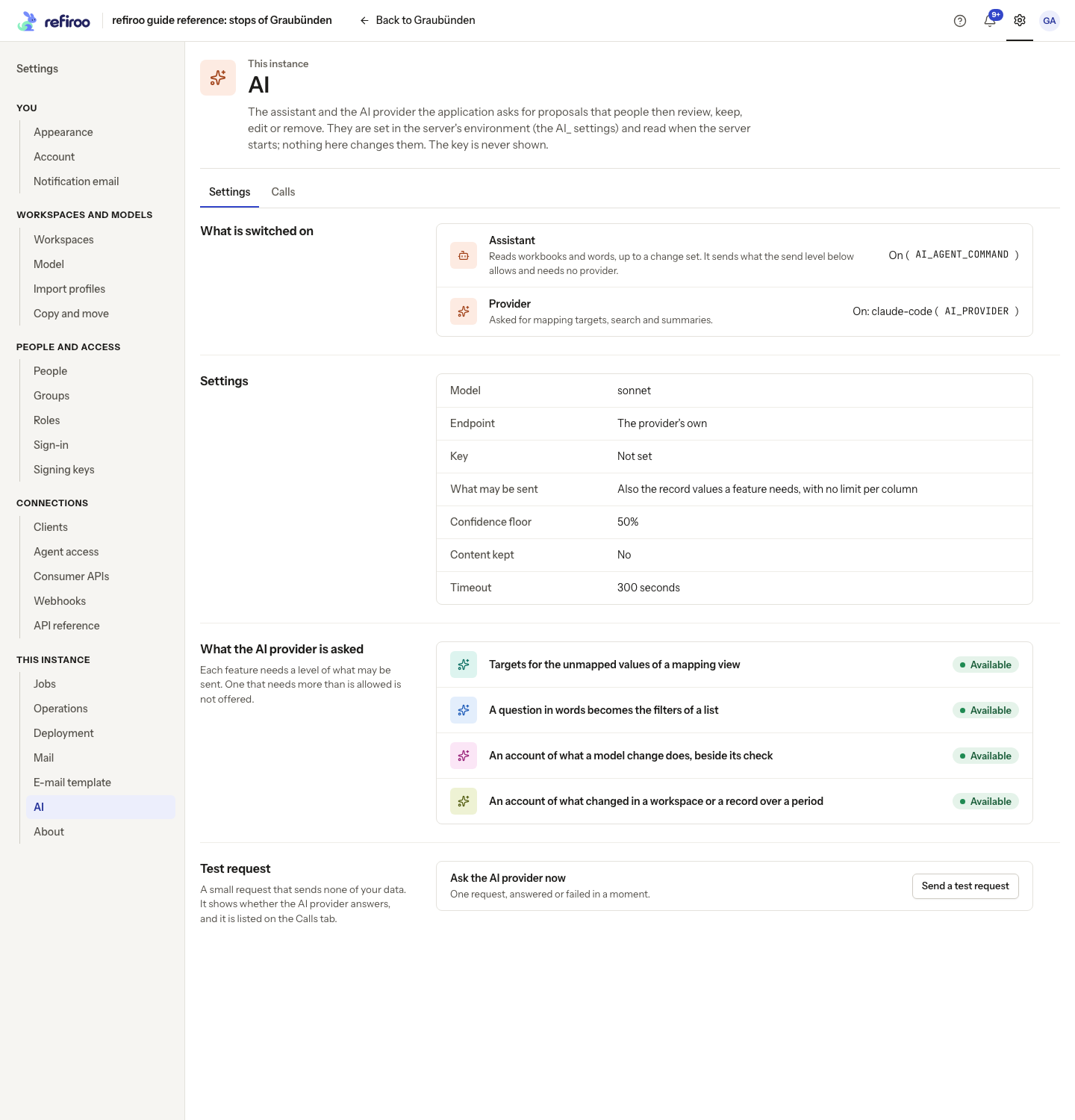
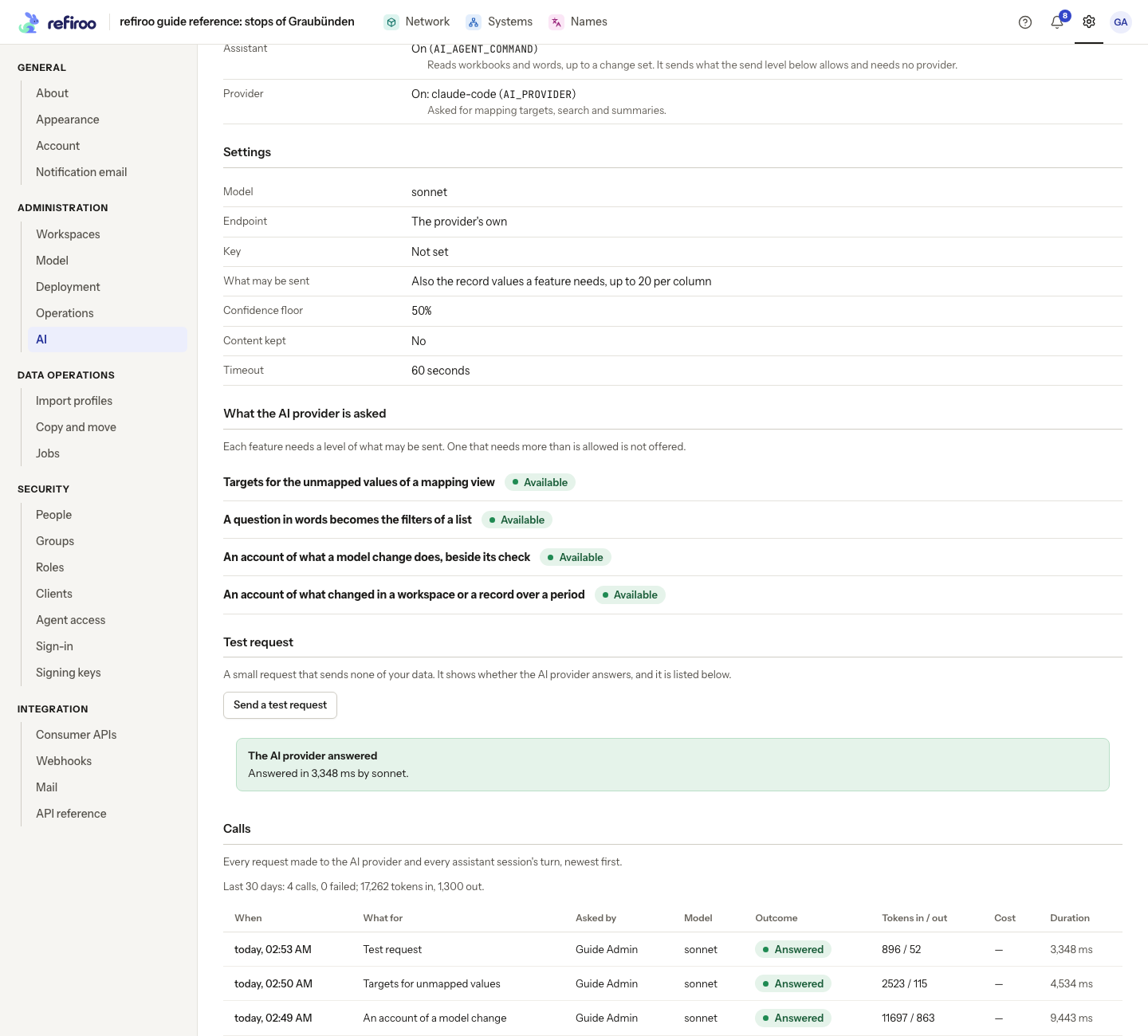
Section titled “Calls and costs”Open Settings › This instance › AI, then its Settings tab, to see which switches are on, the send level and, when a provider is configured, its model, endpoint, whether a key is set, and the features available. The key itself is never shown. This page displays settings; change them in the environment.
The Calls tab lists provider requests and assistant turns, newest first: who asked, what for, the model, outcome, tokens, cost when reported, and duration. A failed call includes a failure message. Show more reads older entries. With no entries, the page says No call has been made yet. When content logging is on and has not expired, expand Show what was sent and answered on a row. Treat that content as sensitive.
Totals cover the last 30 days. An assistant turn counts as one call, including cache reads and writes in its token figures. A dash for cost means no cost was reported, not that the call was free.
Claude Code authentication and billing belong to Claude Code. An API key uses API billing; a subscription token uses its Claude subscription. Provider requests use their separately configured credentials. Check actual charges and usage limits with the provider; refiroo’s call log is not a billing statement.
Send a test request sends a fixed request containing none of your reference data. It tests the provider, appears in the call log and may incur usage. It does not test the assistant.
What is kept
Section titled “What is kept”| Information | Retention in refiroo |
|---|---|
| Call metadata, outcome, tokens and reported cost | Kept after request content expires. There is no configured expiry for the call records themselves; the 30-day totals are a reporting window. |
| A call’s request and answer | Not kept in the call log by default. AI_LOG_CONTENT=true keeps them for AI_LOG_CONTENT_DAYS, default 7, after which content is cleared while the call record remains. For assistant turns this is the prompt and final answer, not the full stream. |
| Assistant task and workbook | AI_TASK_RETENTION_DAYS, default 90 days after completion or the last change. The worker’s expiry sweep deletes the task and its files; cleanup needs a job-enabled instance. |
| Session folder, session logs and Claude Code transcript | Kept while the task can continue, including failed, stopped and loaded tasks. Once the change set is published or discarded, the migration confirmed, or the task discarded, the next task read removes them and deactivates its client. Expiry also triggers cleanup. |
| MCP tool-call records | MCP_CALLS_DAYS, default 90 days. Argument names are recorded, not their values. |
AI_LOG_CONTENT=false does not disable the assistant’s working files or Claude Code transcripts.
Enable call-content logging only while needed: it can contain reference data. These settings do not
control the provider’s own retention.
The shipped Compose file persists each task’s working files, Claude Code configuration,
transcripts and turn logs in the assistant volume at /opt/refiroo/rdm-engine/data/assistant.
Container replacement keeps that volume. A backup may omit it: losing it loses open tasks’
folders and session logs, not records. Normal task cleanup still applies.
When upgrading from the earlier shared-transcript layout, the engine gives existing task folders
random names and keeps their workbooks and files. A task begun before the upgrade starts a new
Claude Code session on its next turn; the old shared transcripts are not moved. The obsolete
assistant-claude volume is no longer mounted. See Upgrades
before removing it.
Provider and assistant settings
Section titled “Provider and assistant settings”Set these in the engine’s environment, then recreate the Compose container or restart the host service. Settings › This instance › AI displays them; it does not edit them.
| Setting | Default | What to choose |
|---|---|---|
AI_PROVIDER |
Empty | claude, claude-code, openai-compatible, or a factory package.module:function. Empty disables provider features, independently of the assistant. See credential choices. |
AI_MODEL |
Empty | Provider model. Claude defaults to claude-opus-5-5; a compatible endpoint requires a model. A factory defines its own default. This does not choose the assistant’s model. |
AI_API_KEY |
Empty | Provider secret; required for claude, optional for compatible endpoints. Never displayed. |
AI_BASE_URL |
Empty | Required for a compatible endpoint, for example http://models.internal:8080/v1. Claude uses https://api.anthropic.com unless a gateway is specified. |
AI_SEND_LEVEL |
values |
structure, samples or values; see the send policy above. A request can choose a lower level, never exceed this ceiling. |
AI_SAMPLE_VALUES |
20 |
Positive number of sample values per column or attribute at samples. Does not limit values or the short relationship lists described above. |
AI_MIN_CONFIDENCE |
0.5 |
Number from 0 to 1. Mapping proposals below this confidence are left unmapped. |
AI_LOG_CONTENT |
false |
Keep requests and answers with call records for debugging. |
AI_LOG_CONTENT_DAYS |
7 |
Positive number of days to keep logged content; metadata remains. |
AI_TIMEOUT_SECONDS |
60 |
Positive number of seconds per provider call. The Claude API adapter makes up to three attempts for temporary failures, so total time can be longer. Does not change the assistant’s 30-minute turn limit. |
AI_REASONING_EFFORT |
Empty | Compatible endpoints only: none, low, medium, high. Empty omits the option. For a local thinking model, none can avoid a long reasoning phase. |
AI_CONTEXT_TOKENS |
Empty | Actual context window of a small model, at least 256 tokens. Mapping requests are sized to half this window; too small a window can refuse even one source. Empty uses the feature’s own batch limit. |
AI_TASK_RETENTION_DAYS |
90 |
Positive number of days to retain tasks after completion or last change; see retention above. |
AI_AGENT_COMMAND |
Empty | Claude Code command, for example claude --model sonnet. Empty disables the assistant. refiroo enforces its own tools and permission mode even if the command supplies another. |
AI_AGENT_SANDBOX |
Empty | container is set in both the shipped image and Compose; Compose overrides any .env value. Otherwise the operating-system sandbox is used. Do not use container on a host to bypass sandbox requirements. |
AI_AGENT_TIMEOUT_SECONDS |
1800 |
Longest one turn of the assistant’s session may take; a turn over it is stopped like a person’s Stop and the task goes back to its last point. |
AI_AGENT_API_URL |
http://127.0.0.1:8000 in Compose; otherwise PUBLIC_URL |
Address the session uses to reach this engine’s API. Compose supplies the address inside the engine container unless overridden. Outside Compose, unset or empty uses PUBLIC_URL; override it if the engine’s machine cannot reach that address. See Set up AI. |
The Claude API needs outbound HTTPS to api.anthropic.com, or the configured gateway. Compatible
endpoints need JSON-schema answers. For Ollama, use its reachable /v1 address and set
AI_CONTEXT_TOKENS to the window the server actually serves, rather than the model’s advertised
maximum. localhost inside Docker means that container. Increase the provider timeout if the model
cannot answer within it; inspect failed calls before changing it.
What people review
Section titled “What people review”- Mapping targets: the person chooses Propose targets. Results are mappings in a change set, with confidence and a reason. The Proposed filter finds them. A person reviews and edits them, then uses the normal approval and publication flow. Editing a target removes its AI mark; history retains the origin of published proposals. Sources changed while the request ran are left alone. Stopping the job keeps proposals already written.
- Questions in words: Ask on a table list turns the question into editable filters. It changes no record. If only part can be expressed, nothing is applied until the person chooses Use these filters. It is absent from trees, mapping grids and the Changes page.
- Model and history explanations: Explain this change or Explain this period sends facts only when pressed. Counts cover the whole set; the provider receives at most 40 facts of each kind with the true totals. Statements link to the facts behind them. Unsupported statements are dropped. An empty history period makes no call. Matching facts are cached for an hour, so a repeated explanation can avoid another call. Current explanations are in English; they are not an assurance that a change is safe.
- The built-in assistant: the person reads the proposed model, the check of every workbook row, questions and warnings, and can edit the draft or tell the assistant what to change. Accept the model lets it install a release and load a change set. A person takes the activation, approval and publication steps. A saved import profile that still fits can load without an AI session or AI cost. Words alone can also prepare changes; a workbook is optional.
A whole type becoming another ends with Preview the migration: a person checks and confirms the migration, which goes live at that confirmation. A partial move uses three steps: activate a release with both types, review and publish the change set, then activate the final release to remove emptied types. The proposal is checked against live records and consumer API contracts before this handoff. An incompatible consumer contract needs its contract version raised; a proposal the data cannot accept returns with the reason for correction. The assistant does not confirm these steps itself. If the final model keeps the old type, only activation and publication are needed; no removal step is shown. Unused session-installed releases are retired when the task ends; a final release needed after a partial move survives. Do not prune releases in use by workspaces or change sets.
Recover an assistant task
Section titled “Recover an assistant task”A task’s page gives its reason and the next action. Stop ends the current turn, preserving the task so the person can continue. A stopped correction returns to the last proposal, with a warning if the draft was already changed. A stopped load discards the change set it was making and returns to the accepted proposal. With no proposal yet, the task is stopped and takes words or discard.
After a failure or stop, give corrected instructions or choose Try again as it was. The same
session continues, or starts if it never ran. If the worker died during a turn, the next turn records
that earlier call as interrupted from the session log. Look for Failed and the failure sentence
in Calls, not only at the latest successful turn. In the container, turn logs sit inside the task folder beside work and claude; on a host they sit beside the task folder.
On a loaded task, Discard and load again discards the unpublished change set, including manual edits, and asks the assistant to reload with the new words. Discard this task ends the task; if it has an unpublished change set that set is discarded too. A published task cannot be corrected this way: start a new task. A missing or expired task leads back to workspaces. A saved layout’s check offers Back to the proposal; if it no longer fits, Read it with the assistant starts a session. A refused migration leaves the reason and the words box on the task.
External agent access
Section titled “External agent access”MCP_ENABLED enables MCP Streamable HTTP, protocol 2025-11-25, at /mcp. The shipped web proxy
passes /mcp and /.well-known/; forward both when supplying your own proxy, and keep PUBLIC_URL
consistent with the public HTTPS address. With the switch off the endpoints return 404 and no agent
token is issued. Settings › Connections › Agent access then says Agent access is off.
| Setting | Default | Effect |
|---|---|---|
MCP_ENABLED |
false |
Expose agent access after restart. Independent of both AI switches. |
MCP_RATE_PER_MINUTE |
120 |
Positive number of calls per person or client per minute, shared across processes. A refused excess call says how long to wait and is recorded as Limit reached. |
MCP_OPEN_REGISTRATION |
true |
Allow assistants to register themselves. Turn off to require registration by a security administrator. |
MCP_REDIRECT_HOSTS |
Empty | Comma-separated HTTPS hosts a self-registered assistant may return to, besides loopback addresses. The assistant’s displayed name is its own claim. |
MCP_CALLS_DAYS |
90 |
Positive number of days to keep tool-call records. Names of arguments are kept, never their values. |
MCP_ANSWER_BYTES |
40000 |
Positive maximum bytes for a tool answer. Large pages shrink and return a cursor; an oversized answer that cannot page is refused. Resources return whole. |
A person’s assistant opens this instance’s own sign-in page with OAuth and PKCE; signing in is
consent. A system’s assistant uses an agent client and its grants, with an agent token. These
tokens reach only MCP; management and consumer tokens cannot call MCP. A consumer-only grant exposes
only that consumer API’s lookup tool. Browse exposes model, record, mapping coverage, history and
change reads. Work in change sets permits adding or editing records and relationships, setting
values, checking and submitting the caller’s own change sets. It cannot remove records or clear
values, discard or withdraw change sets, batch, restructure the model, approve or publish. Submitted
change sets stay frozen. Under a second-person rule the person who asked the assistant cannot also
decide its submission.
Security administrators manage clients, registrations and call records on Agent access. Blocking an assistant or deactivating its client stops access on the next call. Restoring a blocked assistant does not restore ended sessions. People can end their own assistant sessions in their session list. Unused self-registrations with no open session are removed after 30 days; at most 1,000 unused registrations can stand. A registration accepts at most 10 return addresses, each at most 2,000 characters. Repeated registrations from one address are slowed; self-registered return hosts are checked again at sign-in. Tool and resource listings count against the rate limit too. Neither your provider send level nor provider content retention controls what an external assistant keeps after reading permitted data.
Read failures and restore service
Section titled “Read failures and restore service”| Code or outcome | Meaning and action |
|---|---|
AI_NOT_CONFIGURED |
The feature’s own switch is missing: assistant command for tasks, provider for tests and suggestions. No provider means no test call is recorded. Configure the required switch and apply settings. |
AI_SEND_LEVEL_TOO_LOW |
The feature needs more data, or the request exceeds the instance ceiling. Agree a send policy before changing it. |
FORBIDDEN |
Check the missing action group and workspace grants. AI permission alone grants no other write rights. |
AI_TASK_NOT_FOUND |
The task expired, does not exist or belongs to someone else. Ask its requester or a workspace administrator; start a new task if expired. |
AI_TASK_VERSION_CONFLICT |
Another action changed the task. Reload it before trying again. |
AI_TASK_CHECK_STALE |
The draft changed after the check. Check it again before loading. |
AI_TASK_NOTHING_TO_LOAD |
The check has no work to load. Review the proposal and its counts. |
AI_TASK_STATE |
That action is unavailable at this stage. Reload and use the page’s offered next action. |
AI_TASK_DRAFT_HELD |
Another task owns the draft; use a separate draft rather than changing that task’s work. |
AI_TASK_NEEDS_WORDS |
Supply instructions or a supported workbook. |
IMPORT_TOO_LARGE, UNSUPPORTED_FILE_FORMAT |
Respect IMPORT_MAX_BYTES; supply XLSX or CSV instead of legacy XLS. |
unreachable, unauthorized, rateLimited |
Check endpoint/connectivity, replace the refused key, or wait before retrying, respectively. |
declined, malformed, failed |
The provider declined, returned the wrong shape or otherwise failed. Inspect the failure sentence, model and gateway. No partial malformed answer is used. |
timeout, cancelled, interrupted |
An assistant turn exceeded the session limit (AI_AGENT_TIMEOUT_SECONDS), was stopped or lost its worker. Read the task’s notes and continue when the cause is resolved. |
A failing provider leaves the feature’s ordinary work available. Explanations still show their facts; a failed question applies no filters; a mapping request reports a warning and a failed call. Neither the assistant nor an AI provider is set up is the AI page’s notice when both are unset. For command, credential, sandbox and startup failures, follow Set up AI.
Switch off a feature or change its credentials
Section titled “Switch off a feature or change its credentials”Use each feature’s own switch. Empty AI_PROVIDER removes provider features; empty
AI_AGENT_COMMAND removes the built-in assistant; MCP_ENABLED=false removes external agent
access. Apply the change by recreating the engine on every
instance that serves the feature. Turning off one switch leaves the other two independent.
Before a planned assistant shutdown, ask requesters to stop running turns and review outstanding loads. Removing a command is not a way to undo an accepted proposal or published data. Stored call records, tasks, drafts and files are not erased by these switches; their normal lifetimes still apply. Keep job workers enabled where expiry cleanup is needed. For external agents, use the registration and session controls when access must be revoked, rather than assuming an endpoint switch deletes identities or stored grants.
To replace a provider credential, change AI_API_KEY in the private environment, recreate the
engine and send the fixed provider test. To replace the assistant credential, update its
ANTHROPIC_API_KEY or CLAUDE_CODE_OAUTH_TOKEN, recreate, then test an actual assistant turn.
These are separate checks. Revoke the previous credential at its issuer after checking the new
one, or immediately when responding to a leak. refiroo does not renew external credentials for you.
Changing the sealing key does not rotate a provider’s API key.
A provider/model change affects later requests; it does not rewrite existing proposals or call records. Keep the previous private configuration for a reversible setting change, apply it again if needed, and repeat the relevant feature test. The provider’s credential expiry and billing limits are determined by that provider; inspect a refused call and its issuer’s controls.